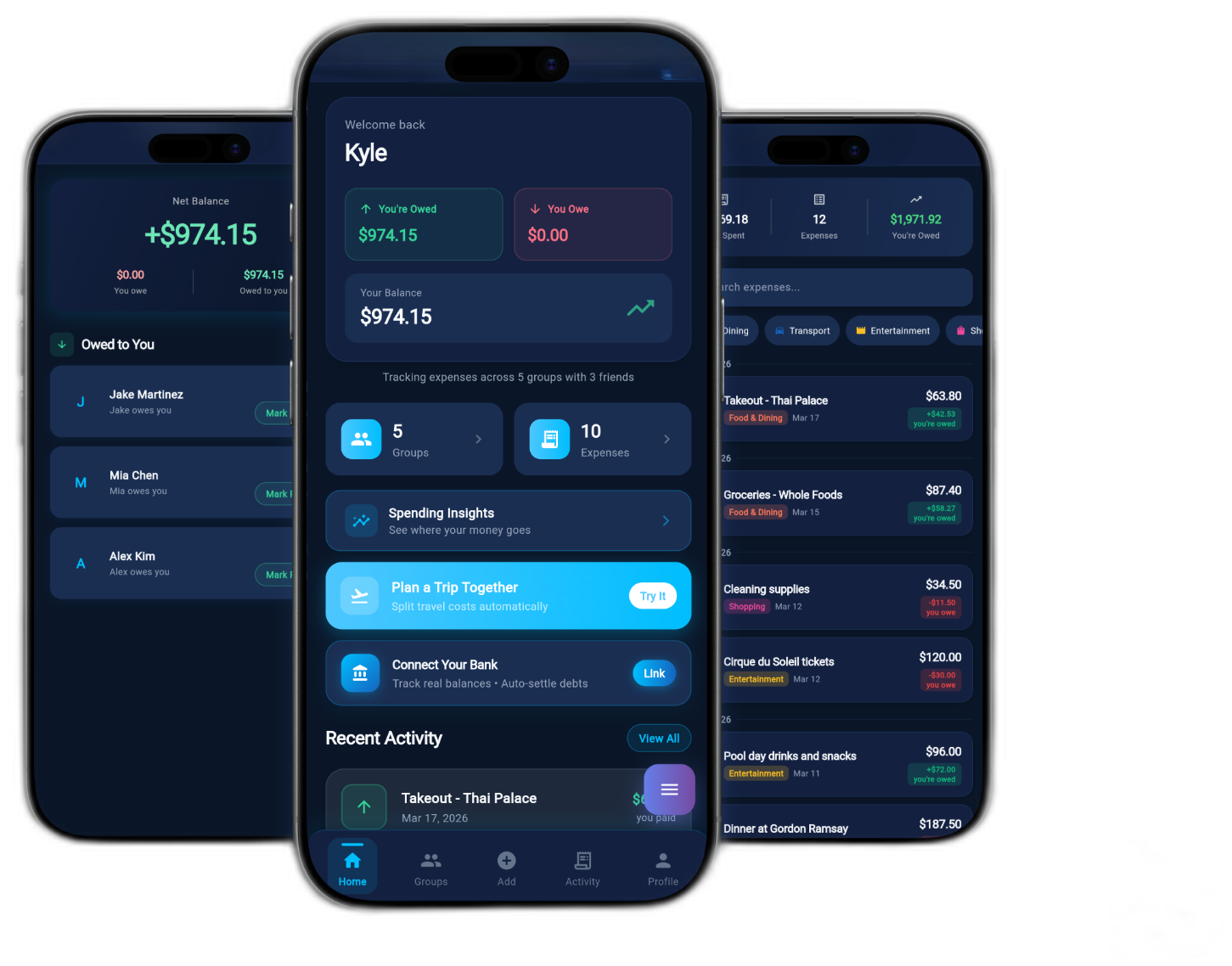
The smarter way
to split expenses
with the people
you trust.
Stop doing mental math in group chats. SmartSplitter tracks every shared cost, splits it fairly, and settles balances in one place.
Equal, percentage, custom shares, and itemized — every situation covered.
One place for every shared expense.
Create groups for trips, apartments, or any shared situation. Every expense lands in the right place automatically, and everyone always knows who owes what — without the spreadsheet.
- Invite by email, QR code, or share link
- Real-time balance updates across all members
- Trip budgets with per-person breakdowns
Fair splits for every kind of situation.
Not every expense divides equally. Split by percentage when contributions differ, set exact amounts, build custom shares per person, or go itemized when everyone ordered something different.
Clear balances. No awkward asks.
See exactly who owes what, request payment directly via Venmo, Cash App, Zelle, or PayPal, and mark it settled when it comes through. The record stays clean for everyone.
Up and running
in 60 seconds.
The demo runs right in your browser — no install, no account required.
Create a Group
Make a group for your trip, apartment, or friend squad. Invite people by email, QR code, or share link — they’re in instantly.
Log Expenses
Add expenses manually or scan a receipt. Choose who paid, who’s included, and how to split it. Every method in a few taps.
Settle Up
SmartSplitter calculates the minimum payments to clear all balances. One tap sends a payment request via Venmo, Zelle, or any app.
“Finally an app that doesn’t make splitting dinner feel like doing taxes.”Madison R. — used after a 6-person beach trip
“We used it for our entire Cabo trip and settled everything in one night.”
Tyler K.“My roommates and I stopped arguing about rent expenses. That’s worth everything.”
Priya S.“The receipt scanner alone saved us 20 minutes at every restaurant.”Jordan L. — regular group dinner organizer
“Custom split shares are a game-changer when people order different things.”
Marcus W.“Clean, fast, and the dark mode actually looks good. Rare for a finance app.”
Aisha T.“I sent the demo link to my whole friend group and two people signed up that same night.”Cameron B. — apartment of four roommates
“The expense categories make it easy to see where the group money actually went.”
Nadia F.“Best bill splitter I’ve tried, and I’ve tried too many.”
Derek M.Start free. Upgrade when you’re ready.
Everything you need to get started splitting expenses with friends and groups.
- Up to 3 active groups
- Unlimited expenses per group
- All 4 split methods
- Settle up with payment app links
- Basic spending summary
For power users and groups that go deep — analytics, unlimited everything, and priority support.
- Unlimited groups
- AI receipt scanning
- Full spending analytics & charts
- CSV & PDF export
- Trip budgets with per-person view
- Recurring expenses
- Bank account linking via Plaid
- Priority support
Questions people actually ask.
If you don’t find what you’re looking for, we’re easy to reach.
Contact support →The browser demo is the full SmartSplitter app running in your browser via Flutter Web. It has all the same features as the upcoming native apps — it just runs in your browser tab instead of natively on your phone. The native iOS and Android apps are in development and will launch soon. Sign up below to be notified.
Yes. The Free plan has no time limit and includes everything you need to split expenses across up to 3 groups. No credit card is required and the plan doesn’t expire. Premium unlocks unlimited groups, AI receipt scanning, analytics, exports, and more for $4.99/month with a 14-day free trial.
All data is stored in Firebase with 256-bit AES encryption at rest and TLS in transit. Authentication supports email/password, Google, and Apple Sign-In. Two-factor authentication is available for accounts that want an extra layer. We never sell user data and you can export or delete your account at any time.
When you add an expense, you choose who paid and who’s included. Then pick your split method: equally, by percentage, exact amounts, or itemized per person. SmartSplitter records each person’s share and updates the running group balance. When it’s time to settle, the app calculates the minimum number of payments needed to clear everything.
SmartSplitter generates deep links for Venmo, Cash App, Zelle, and PayPal. Tapping one opens the payment app with the amount and recipient pre-filled. The actual money transfer happens in the payment app, not inside SmartSplitter. After paying, mark the balance as settled and it clears for everyone.
The AI receipt scanner uses Google ML Kit to extract the merchant name, date, line items, and total from a photo of a receipt. It runs a validation pass and flags anything that looks off before you confirm. You review the data and edit anything it missed before the expense is saved.
The native apps are in active development. The iOS app has been submitted to App Store review. Sign up for launch notification below and you’ll get an email the day they go live — no spam, just that one email.
Yes. The CSV and PDF export features on Premium make it easy to generate expense reports for reimbursement. Many users track team lunches, client dinners, and shared office costs. For larger organizations with complex approval workflows, a dedicated expense tool may be a better fit, but for small teams SmartSplitter works well.
Be first when the apps launch.
One email when iOS and Android go live. That’s it.